


Define the customer
The manager records who the work is for and how their delivery files should look.
Add customer
No notification. Setup is quiet.

Give your field team a clear checklist. Collect the evidence, check the details, and put human review before handover.
For field service teams installing Wi-Fi across customer sites. Free for 14 days, up to 10 jobs — no card required.
Photos and documents from site.
AI pre-checks. Human decisions.
A versioned record of the work.
Give technicians a clear checklist for every device. Keep photos and documents connected to the job they belong to.
Know which device, requirement and location each file belongs to.
Open assigned jobs before going offline. Capture supported files, including iPhone HEIC when this browser can convert them, then reconnect with the app open to finish uploading.
A pre-check can flag a mismatch. A reviewer sees the evidence, asks for corrections and decides what is ready for handover.
EnlargeThe file reached the workspace.
The AI pre-check found a match.
A person reviewed and approved it.
Three separate states.
One traceable record.
Follow a fictional job through the actual product screens: who does what, what the AI pre-check says, and who gets told at each step.
The manager records who the work is for and how their delivery files should look.
No notification. Setup is quiet.
Each customer site becomes a branch. Jobs and reports are always tied to one.
No notification. Setup is quiet.
Team members join by invitation. A technician only ever sees jobs assigned to them.
A template defines the required evidence. Devices carry the identity the field photos must match.
| Device name | Expected serial number | Expected MAC address | Installation location |
|---|---|---|---|
| AP-01 | NS-AP-240001 | A4:5E:60:11:02:1E | Front sales floor |
| AP-02 | NS-AP-240002 | A4:5E:60:11:02:2E | Stockroom entrance |
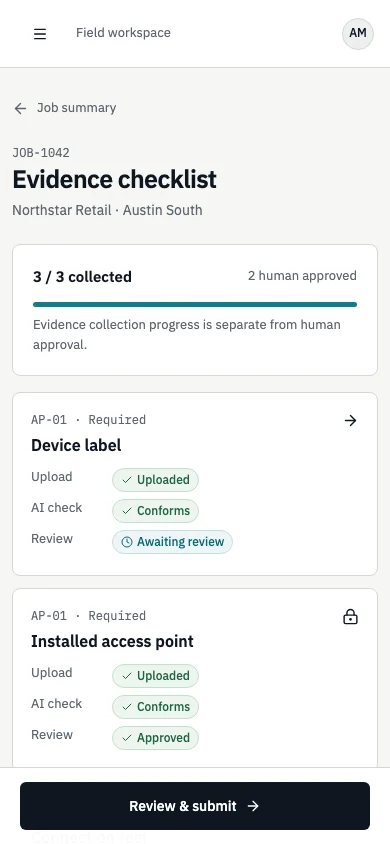
From the installed app on the phone, the technician follows the checklist, even without signal, and submits when done.
JOB-1042
Northstar Retail · Austin South
Evidence collection progress is separate from human approval.
AP-01 · Required
Device labelAP-02 · Required
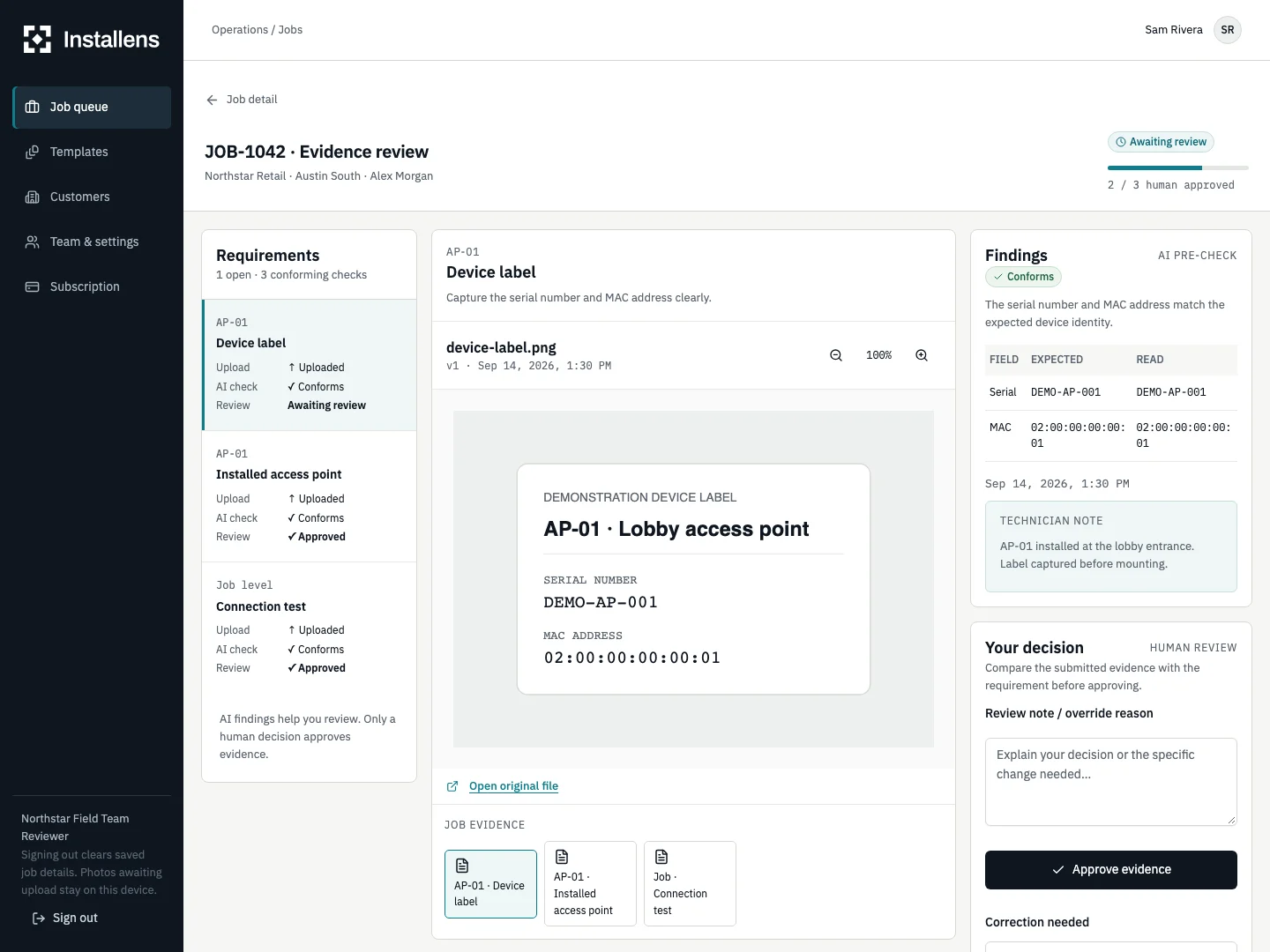
Device labelEach upload is compared with the configured requirement. It reports facts and findings. It never approves.
AP-01 · Device label
FindingsConformsThe serial number and MAC address match the expected device identity.
| Field | Expected | Read |
|---|---|---|
| Serial | NS-AP-240001 | NS-AP-240001 |
| MAC | A4:5E:60:11:02:1E | A4:5E:60:11:02:1E |
AP-02 · Device label
FindingsMismatchObserved serial NS-AP-240012 differs from expected NS-AP-240002.
| Field | Expected | Read |
|---|---|---|
| Serial | NS-AP-240002 | NS-AP-240012 |
| MAC | A4:5E:60:11:02:2E | A4:5E:60:11:02:3A |
Job level · Connection test
FindingsConformsBoth measured values meet the configured thresholds.
| Field | Expected | Read |
|---|---|---|
| Download (Mbps) | ≥ 100 | 142 |
| Upload (Mbps) | ≥ 20 | 31 |
UploadedConformsApprovedThree separate states. Only a person can set the third one.
The reviewer sees the photo, the expected values and the finding side by side, then approves or asks for one specific fix.
AP-02 · Device label · v1
Approve it, or send it back to Alex Morgan with one specific fix.
Message to the technician
The technician sees the one open correction, adds a new version, and the six approvals stay untouched.
JOB-1042
Your reviewer has left a specific request for each item. Other approvals are preserved.
AP-02 · Required
Device labelNew photo requested
The label photographed is not the unit shipped for AP-02. Please photograph the label on the installed access point at the stockroom entrance.
Technician note
First photo was the spare unit in its box. This is the mounted device.With every required item approved by a person, the reviewer publishes a frozen, versioned report and shares it.
JOB-1042 · Replace two ceiling access points
Handover reportsApprovedEvery published version is a separate, permanent snapshot.
The recipient must sign in using the exact email address above. A link alone does not grant access.
Fictional company, people and devices. Screens are simplified renderings of the product, not marketing illustrations. Push notifications and emails are delivered through the configured providers of your workspace.
Workspace access and expiring file links. Originals kept apart from public assets.
The AI pre-check supports review. It never certifies the installation or approves the job.
Corrections create new versions. A subscription change does not erase the record.
A few things your team will want to know.
Open assigned jobs while connected to save them on the device. Supported photos and documents can then be captured offline. Keep Installens open when connectivity returns to finish uploading. Submission and review decisions need a connection.
No. Uploaded, Conforms, and Approved are separate states. A reviewer examines the submitted evidence and makes the human decision. An override requires a written reason. Installens does not certify the physical installation.
JPEG, PNG, WebP images and PDF documents up to 20 MB per file. iPhone HEIC (High Efficiency) photos are converted to JPEG when the browser can read them; keep the original HEIC. If conversion is not available, export a JPEG from Photos (Share → Options → Most Compatible) or set Camera → Formats → Most Compatible. Keep original files until the server confirms the upload.
Use Add to Home Screen in iPhone Safari or Install app in a supported Android browser. You can also work directly in the browser. Open assigned jobs before heading offline.
A versioned handover report with the evidence and human review record. Download the PDF or a ZIP with original files, an expected/read CSV and checksums. Account access requires the invited email address by default. You can also choose a private recipient link that expires in seven days; anyone holding that link can open the report until access expires or is revoked.
Record the work order, delivery platform and customer PO references, then export the reviewed PDF or ZIP for the delivery process agreed with your customer. Direct contractor-portal integration is not available yet. Agree the required delivery format before the pilot.

Define one job, collect the evidence, and review the handover with your team.
Free for 14 days, up to 10 jobs — no card required. When the trial ends, new jobs and uploads pause until you subscribe; existing evidence, reports, share links and login stay available. Any subscription price and terms are shown before checkout.